This is not a feature-by-feature fact sheet. It is one web designer telling you which platform to choose for your small business or startup website, and why. The numbers support the opinion. They do not replace it.
I agree that I compare apples with oranges here. Framer, Webflow, Wix, Squarespace and Voog are cloud-based website builders. WordPress is open-source software you host. Astro is a framework. Lovable is a prototyping tool. They are different things. But people choose between them for the same job.
So let me start with what we compare, and with myself. To be fully honest up front: my pick is mostly Framer.
What kind of website this is about
A typical small company or startup marketing site. Picture a medical clinic or a tech startup. It has a home page, a page for each service, the team, prices, a contact page and maybe a blog. One or two languages. A booking button that links to an outside system.
No complex functionality. No member area, no shop with a thousand products, no custom app. Most business websites, in Estonia and all over the world, follow pretty much the same structure.
That is the baseline. Every platform here can do more. For a large shop, a news portal or a web app, the answer is different. That is not what this article is about.
Why I have a strong opinion
I have built on all of them. I started using WordPress around 2010, mostly as a designer. But almost every year I built a site or a few myself. I designed a custom admin panel for an enterprise WordPress site. I have used Wix and Squarespace in projects. Before 2020 I designed in Figma and built in Webflow. I have used every main tool in this article deeply, in professional work.
I choose the technology that works and is on top of the game. In 2019, when I built my agency’s site, Give, I chose Gatsby, which is in the same family as Astro. The site was really fast and technically top. It ranked really well in search. Most of our competitors were on WordPress, and much bigger agencies ranked way worse, even though they focused a lot on search engine optimisation.
Today my pick is mostly to design websites in Framer, with AI-based workflows next to it. The site you are reading right now runs on Astro, as an example.
My bias is obvious. I was probably the first Estonian Framer Expert. I make money from Framer projects, sell Framer templates and get affiliate commission. That does not make my opinion wrong. I am not paid for this, and it is not a paid promotional post, as many Framer creators make. I care about the tool that gives the best result.
How I judge. As a professional user. I work in these tools all day. Every millisecond of waiting after a click is a disturbance. I craft pages. I do not just want to get something out. It is also important to me that my clients get a trustworthy website that is easy to work with. If your goal is any website, fast, your picture may differ.
The short answer
Framer is the best tool for a marketing website. Astro is my second pick, when the site needs to be the fastest and fully custom. Webflow, WordPress, Wix, Squarespace and Voog all work. But I see no advantage in using them over Framer.
| Best for | Biggest strength | Biggest weakness | |
|---|---|---|---|
| Framer | Marketing sites, small and medium business sites, landing pages, portfolios | You design the thing that gets shipped | Price of languages, vendor risk |
| Astro | Tech-focused companies, exact optimisation | Speed and full control | No visual editor |
| Webflow | Marketing teams that need an advanced CMS | Deep CMS and layout control | Harder to build in than Framer, slower to update |
| WordPress | Large publishing sites, self-hosting | Open source, can do anything | Slower builds, complicated security upkeep |
| Wix | Small businesses that need bookings or a shop | Most business features in one account | Complicated to use, many editors, hard to leave |
| Squarespace | Simple, good-looking sites in English | Polished templates, all in one | Languages need a paid add-on |
| Voog | Simple Estonian sites in several languages | Estonian support, languages included | Few, limited templates, few people who build on it |
| Lovable, Replit, Base44 | Apps and digital products | You can build apps | Made for apps, websites are not their focus |
Three questions that decide it
You can launch a moderately good website on any of these. So the useful question is not “which is best”. It is “which fits your project”. Three questions do most of the work.
1. Who will build and update the site?
- A designer: Framer. The design is the site.
- A developer, or someone comfortable with Claude Code or Codex: Astro.
- A marketing team with a lot of structured content and no developer: Framer still works. With a very large amount of content, WordPress.
- Background matters. A developer with ten years of WordPress finds their way around it without thinking. For everyone else, WordPress is harder to find your way around than Framer.
2. How many languages?
- One: Framer works great.
- Two, three or more: Framer and Webflow charge per language. Framer gets more expensive, but in my opinion it is still worth it. Wix and Voog include languages. WordPress and Astro do not necessarily change in price.
3. Do you need bookings or a shop?
- Yes, built in: Wix. For a real online shop: Shopify.
- No, you need a branded, high-quality business site: Framer.
And look at the big plan, not only today. Sometimes a quick Framer site makes sense even when a powerful content machine is planned for next year.
Framer: the best tool for marketing websites
Why I choose Framer first
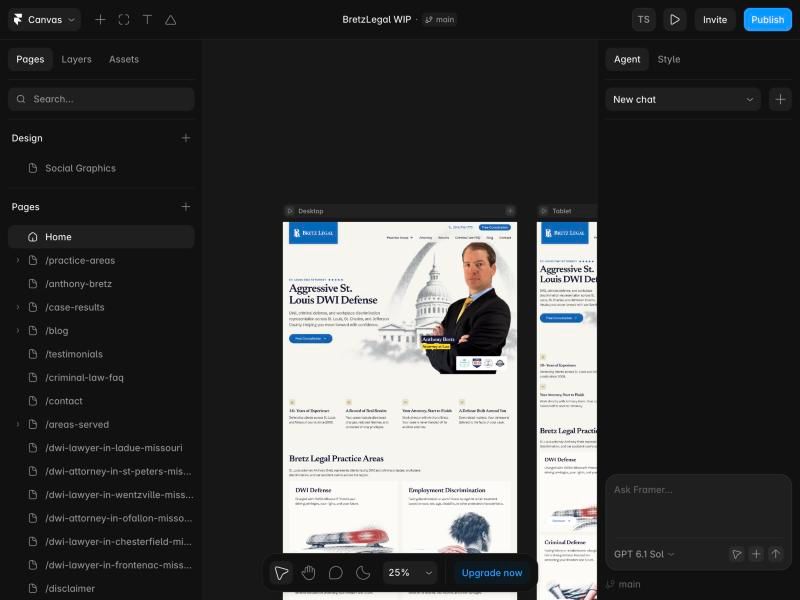
Design and build happen at the same time. This is the big win. You design the thing that gets shipped. There is no handover, so nothing gets lost. What is on the canvas goes live, pixel perfect. When a designer builds the whole site, the person who cares most about details makes every decision.
It is a real app with a real canvas. Framer has a native desktop app and also works in the browser. Webflow, Wix and WordPress run only in the browser, which is slower. In Framer I zoom around one canvas. Desktop, tablet and mobile sit side by side, so I see at once how a page responds.
The Agent puts Framer level with AI-coded sites. Framer’s Agent builds pages from a description, restyles a site, manages CMS content and finds broken links. In November alone, per the update log, Framer rebuilt the Agent’s engine. It also added funnels, A/B tests and image generation. An official MCP server, free in preview, lets Claude or Cursor edit a Framer project. The main argument for coding a site, that AI can do the work, now applies to Framer too.
Skills make it convenient for clients. A Skill is a saved set of instructions for the Agent. A designer can ship Skills with the site: how the brand writes, how a case study page is built, what to check before publishing. A client with some experience can then do many simple things alone. The result still follows the design.
It just works. A Framer site is stupidly simple to run. You click publish, and it is live. There is no server, no installation, no updates and no plugins to patch. Framer, a big company, hosts the site and keeps it running. Wix and Webflow give the same advantage. Compare that with an Astro site on Cloudflare, a headless setup or WordPress on a server. Even when a hosting provider installs it for you, it is still a technical setup that someone has to look after.
The client has freedom. The client does not own the code. But the client is not tied to me either. There are a lot of Framer experts. If I cannot or do not want to work on the site any more, the client hands it to someone else and carries on. It is the same advantage WordPress has. Compared with Voog, many more people can take over the site. With a custom-coded site, the next person first has to learn how it was built.
Framer website builder weak points
I do not praise Framer blindly.
- Languages are expensive. Each extra language costs €20 a month more. Two languages roughly triple the cost of a small site.
- No official code export. You can ask an AI agent to copy your site into code. For a simple marketing site, moving is no longer a big problem. For a multilingual site with hundreds of pages, it still gets risky.
- The CMS is lighter than Webflow’s. A page address can have only one dynamic part.
/blog/:my-postworks./:city/:servicedoes not. That hurts some programmatic SEO projects. For everyday editing, lighter is better. Clients who used Webflow before tell me the Framer CMS is much easier. - It is not perfect. It still has bugs.
- It takes some learning. It is relatively easy for designers with experience in canvas-based design tools. Complete beginners still need to learn how websites work.
- I cannot be confident about its future. This is my opinion. Framer changed the game. It was not first, but it made designing and shipping at the same time really convenient. Now the team is growing, and in my daily use the quality is going down.
- It is venture-funded. Framer raised $100 million in August 2025 at a $2 billion valuation. Investors expect growth: higher prices, a new direction or a sale. Framer reworked its plans twice in about a year. The last change lowered prices. The next one may not.
Verdict. For a marketing site in one or two languages, Framer is my first choice. Just know it is a venture-funded service you rent.
Astro: my second pick, for control and speed
What Astro is
A framework, not a builder. Astro is open source and highly popular right now. So building a website works differently. There is no canvas. You, or an AI, write components and content in code. Astro turns them into plain, very fast HTML: a folder of files you can host almost anywhere. Next.js and Gatsby do a similar job. I focus on Astro because it is built for content websites.
It is in good hands. Cloudflare took over the company behind it in January 2026 and kept it open source. Astro 7 came out in June.
AI changed the maths
This is why Astro is in this article. You can now build a website with Claude Code, Codex or other AI tools. A coded site used to need a developer for every change. Now I describe the change to Claude Code or Codex, review it and publish it.
People are switching to it. On X, many people report they used to build in Framer and now build in Astro with AI. There are two usual reasons: cost and loading speed. That is partially true. Astro is cheap to host and fast by default. But a well-built Framer site is fast too.
Why this site runs on Astro
I moved it from Gatsby to Astro this month. Two languages, a blog and a request form, on Cloudflare’s free tier.
The goal is the best technical freelance designer site in Estonia. I want 100 in every Google Lighthouse category. I want the best Estonian freelance designer website, one that ranks well. For that, I am ready to put in the focus, sweat and energy. That is the same reason I would choose Astro for some client projects.
I am one person. I do not need administration or editor accounts. I update the content with AI, or by hand, myself.
With a team, I might choose differently. If I had even a small team, I would want a content management system and clearer processes. That is where Framer, Webflow or Wix, with their cloud-based dashboards, are useful. But note that Framer charges extra for each editor. That is worth weighing too.
Why Astro is second
- Design takes double work. You start from a finished design, or vibe code one with AI. The first means a lot of work before the build: designing every page first takes a lot of time, and then it is built again in code. The second needs a good designer’s eye. Fully AI-coded designs are still not there.
- No visual editor. If you cannot read code, and have nobody who can, Astro is the wrong choice.
- It might need a separate CMS. If you want more control over content, or want others to add news and blog posts, you might need a separate CMS, such as Sanity or Cloudflare’s EmDash. That can cost money. Every connected system adds complexity.
- You are the maintainer. Deployment, security, uptime and upgrades are yours. Hosting can be free. A hosted builder’s price includes a CMS, editor accounts and support. Here you provide those yourself.
Verdict. As a designer who can code, I pick Astro when I can spend a little more time and need a really high-quality site, or one that pushes the boundaries. For a regular client it can be overkill.
Webflow: reasonable, but Framer does it better
What makes it special. Webflow is the visual tool that thinks like a developer. It has a real box model, classes and a proper relational CMS. For a large structured site it is more capable than Framer. It can export static HTML, CSS and JavaScript. That needs a paid Workspace plan, and CMS content does not come along as pages.
Weak points.
- Slower to work in. You assemble a site through a control panel, in the browser only. In Framer you design, in an app.
- Steeper learning curve. This is based on client feedback. Startups I have built Framer sites for, who used Webflow before, tell me Framer is much more user-friendly.
- Its home ground is under attack. Webflow’s best case is the complex site. That is where Astro with an AI agent now wins: no limits, no monthly fee, full ownership.
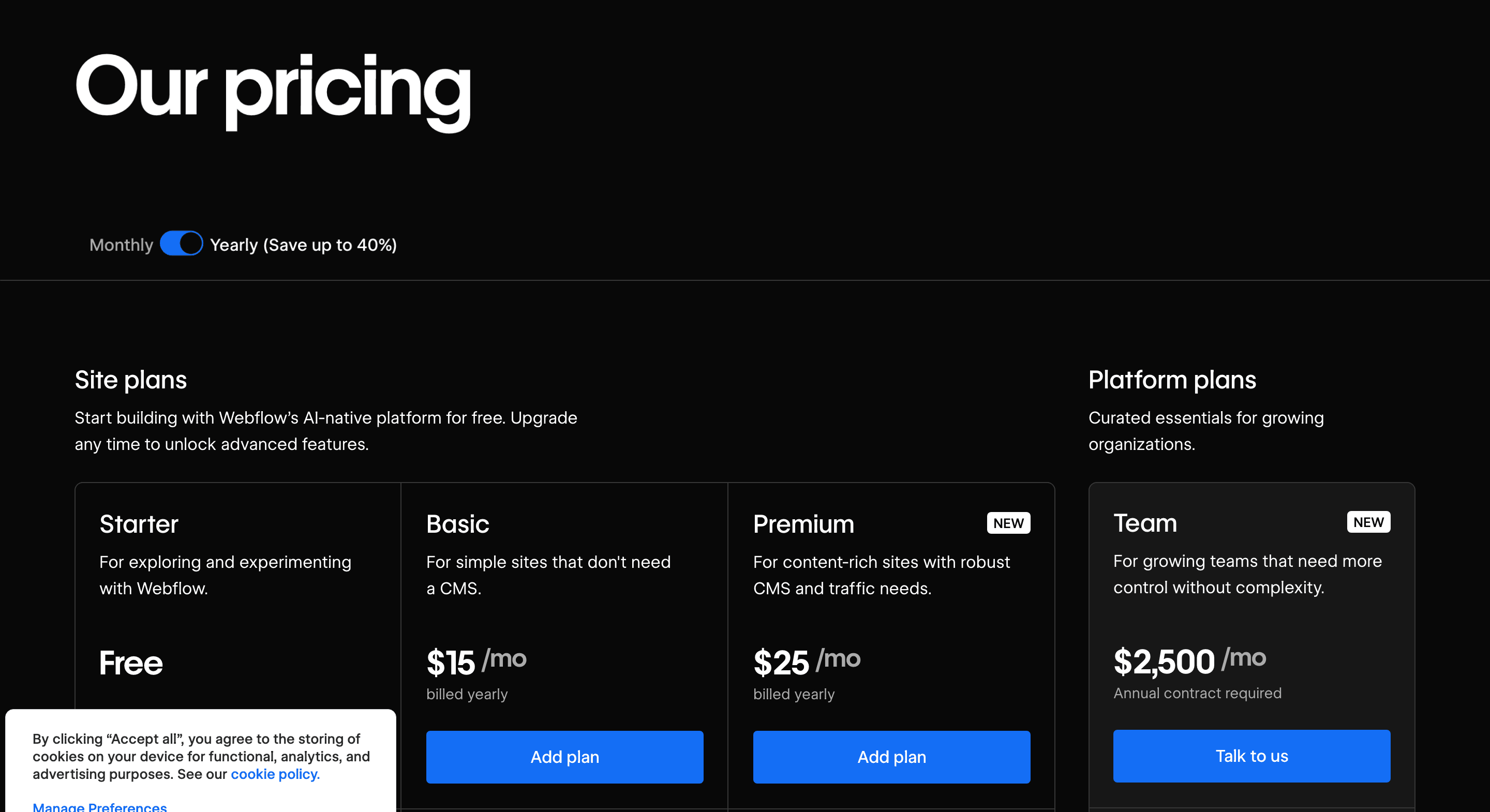
- The same uncertainty as Framer. It is venture-funded too, and we do not know how it will change. In May 2026 Webflow merged its plans into one Premium plan at $25. Two weeks later it laid off staff, for the second time in under two years.
- Still small. After more than ten years it runs 0.8% of all websites.
Verdict. Webflow is reasonable, especially for a marketing team that needs an advanced CMS. But Framer is more user-friendly and builds similar sites. I see no clear advantage in choosing Webflow today. To be fair: I have not built in Webflow in the past year, apart from checking in to stay familiar.
WordPress: capable, but over-recommended
WordPress market share
It is everywhere. 38.5% of all websites run on WordPress, per W3Techs on 17 November 2026. So a huge number of developers and agencies know it well. People prefer what they are familiar with. Many do not know there are better options for their case.
- WordPress38.5%
- Wix4.2%
- Webflow0.8%
- Framer0.2%
Source: W3Techs
But its share is falling. For four years WordPress held steady at about 43%. Since January 2026 it has dropped to 38.5%. That is 4.5 points, or about one in ten of its sites. W3Techs surveys well over 20 million sites. So the drop is roughly 900,000 websites in their sample alone. WordPress is losing momentum. In my opinion, its way of building websites is old-fashioned thinking.
- 43.2%2022
- 43.1%2023
- 43.1%2024
- 43.6%2025
- 43.0%2026
- 38.5%Nov 2026
Source: W3Techs
What makes WordPress special
It is yours. WordPress is open source and can do anything. You own the files and the database. With a server, you can run it, and no company can switch you off. No hosted builder matches that.
There are good reasons to choose it. Editorial workflows, plugins, existing infrastructure, a large developer ecosystem. It works with AI too. The official MCP Adapter connects agents such as Claude to a WordPress site.
My point is narrower. For marketing websites, WordPress is mostly over-recommended.
Why WordPress gets recommended so often as a content management system
Mostly comfort. Developers work in what they know. Most people do not test new tools. Some are reluctant to try Framer because it feels like it takes their job away. That is a human fear, and I understand it.
There is a business side too. WordPress needs updates and maintenance. For an agency, that is recurring revenue.
Why I rarely choose WordPress
Design and build are separate steps. This is my main objection. You can design directly in a WordPress page builder, and many do. But in my opinion the outcome is rarely a professional, high-quality design. In my own workflow, a WordPress site at the quality I want is designed first in Figma. Every page needs a desktop and a mobile view. Eight unique templates means at least 16 views. Then a developer rebuilds the design as a theme. AI helps at both steps. But the process is still longer, and quality is lost at every handover.
So a high-quality site costs more. In my experience, a website that costs €5,000 in Framer would cost €15,000 to €20,000 in WordPress at a similar level of detail, with interaction design.
Editing is less convenient. After launch, page builders such as Elementor are a different experience from designing on a canvas. Managing content is less convenient too.
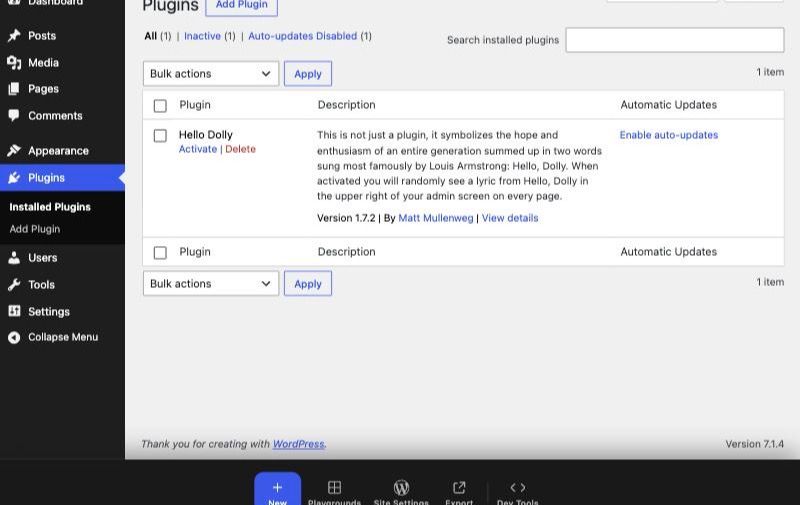
Plugins are good and bad. They are why WordPress can do anything, and where the trouble starts. A plugin needs configuration and can conflict with others. Each one adds menus and settings to the admin. When I open a site I built in 2015, I first have to work out how it was put together. A basic marketing site hardly needs plugins at all.
WordPress weak points
- Security is a bit of a lottery. Most sites never get hacked. But WordPress is everywhere, so its weak spots are public. Patchstack counted 11,334 new vulnerabilities in the WordPress ecosystem in 2025, about 91% in plugins. Every fix is published openly. Once it is known how to get into a site like yours, anyone can try. For a small business the risk is not high, and a backup can often be restored. But is it worth the worry?
- You are always under fire. Years ago I woke up on a Saturday to about a thousand emails from a security plugin. Bots were trying to log in and testing back doors. As far as I know, none of my sites has been hacked. But someone is always trying the door.
- Skipped updates come back with interest. Old PHP versions expire, and hosts may charge extra to keep one running. If a client skips updates for years, the big update will most probably break the site. AI can help fix it now. A few years ago it could not.
- It needs optimisation to be fast. For every visit, the server runs PHP and queries the database. A static site sends a finished file. WordPress can be fast, but it takes work.
WordPress as a headless CMS
What it means. WordPress can run only the content. Editors write in the familiar admin. The front end is a separate site built in Astro, Gatsby or Next.js. It pulls the content through the REST API or WPGraphQL.
Why people do it.
- A team already lives in WordPress, with years of content and workflows, but wants a faster, fully custom front end.
- The same content feeds several places: the website, an app, dashboards or other data tools.
- The admin is hidden from the public site, so there is less to attack.
What it costs. Two systems instead of one. Many plugins that shape the front end stop working: page builders, SEO, forms. Previews get harder. You need developers on both sides. The process gets much harder.
Not our focus. It makes sense for large teams with complex needs. For the small clinic site in this article, it is overkill.
WooCommerce, briefly
It is the shop for WordPress. For a small local shop it is OK. Shopify is the market leader for a reason, and I would pick it, from about $29 a month. If the monthly fee is the main thing you are weighing, WordPress or an Astro site on Cloudflare is the most cost-effective route.
Verdict. WordPress works and is fully yours. Choose it when owning and self-hosting matters most. Not because your developer already knows it.
Wix: more features. Do you need them?
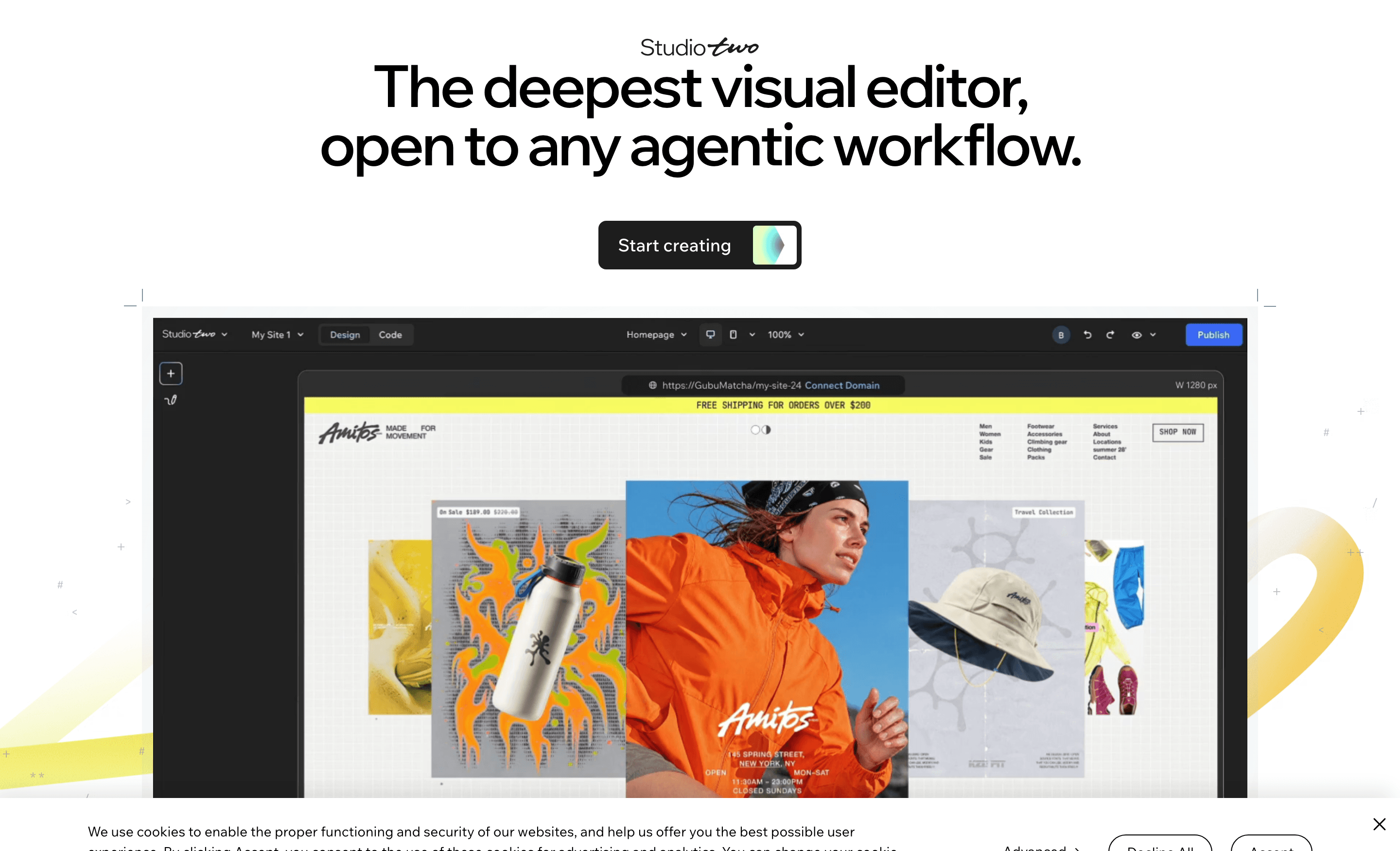
Which Wix website builder? The editors explained
Wix has many editors. My experience comes mostly from early Wix, the classic Editor and Wix Studio. I talk about Wix in general here.
| Editor | What it is | Status in November 2026 |
|---|---|---|
| Wix Editor (classic) | The original drag-and-drop builder | Supported |
| Wix Harmony | AI-first builder with the Aria agent, from January 2026 | The new default |
| Wix Vibe | An earlier AI “vibe coding” builder | Closed for new sites |
| Wix Studio | Professional editor from 2023, for designers and agencies | Supported |
| Studio Two | New AI-native professional editor, announced 2 November 2026 | Rolling out to Partners first |
| Wix Headless | Wix’s shop, bookings and CMS behind a site you code yourself | Available |
Wix has more features than Framer
Business tools are built in. An online shop, calendars, bookings, events and email marketing. Languages cost nothing extra. Wix is a public company, not a venture-funded startup. Sounds like a great deal?
So, do you need Wix? Do you need more features, or a simple, branded, high-quality design? Most websites need the second. For that, Wix has no advantage over Framer, with one honest exception: languages. Wix includes them. In Framer each one is a monthly cost.
One local note. In my experience, Wix bookings and shop work less well in the Estonian market.
Wix vs Framer among the 10,000 most visited sites
Wix is big. It runs 4.2% of all websites. Framer runs 0.2%. 60% of Wix’s revenue comes from North America, where most web design money is. Whoever owns that market is hard to beat.
But look at the sites that get the traffic. The gap closes. Among the 100,000 most visited sites, the two are level. Among the top 10,000, Framer is ahead.
- Framer0.4%
- Wix0.3%
Source: W3Techs, 16 November 2026
Wix Studio Two
The promise. Wix says a Studio Two project can leave as a standard React project, be edited in Claude or Cursor, and come back. The export is still in beta. That would end the oldest Wix complaint: that you can never leave.
My own test. I tried to build a site with its AI, and it did not publish. Wix’s known issues page lists six features as “coming soon”, including full localization. It is an early-stage product. I hope it improves.
Wix weak points
- Too many editors. It is confusing to choose. A site built in one usually cannot move to another.
- Lock-in. You cannot export a Wix site or switch its template after building.
- Heavier pages. A 2026 review of Wix Studio gives it 6.5 out of 10. It names heavier, less clean code as the main drawback. Wix sites can still pass Google’s speed tests. It takes more care.
- Limited control over design details. It is still a browser-based building experience. Studio is far better than classic Wix, but it is harder to build a good, pixel-perfect website. If a company cares about its brand, Wix is still lacking.
Verdict. Choose Wix when you need its bookings or shop. For a branded marketing site, choose Framer.
Squarespace: polished, but made for English
What it is. An all-in-one builder known for good-looking templates. It runs 2.4% of all websites, mostly in the US. I have used it in projects for US audiences. Since 2024 it is owned by the private equity firm Permira.
What it does well.
- Polished templates. A simple site looks good fast, without a designer.
- All in one. Hosting, domain, a shop, invoices and email campaigns in one account.
Weak points.
- Languages are an add-on. There is no full multilingual editor built in. Squarespace sends you to Weglot, a separate paid service.
- Design freedom. Better than classic Wix, but far from Framer’s canvas.
- Hard to leave. Only blog posts and basic pages export, in a WordPress format. The design stays behind.
- Shop fee on Basic. 2% per sale on the cheapest plan.
Verdict. Fine for a simple English site that should look good quickly. For a multilingual Estonian site, or a distinct brand, I would choose Framer.
Voog: the Estonian website builder
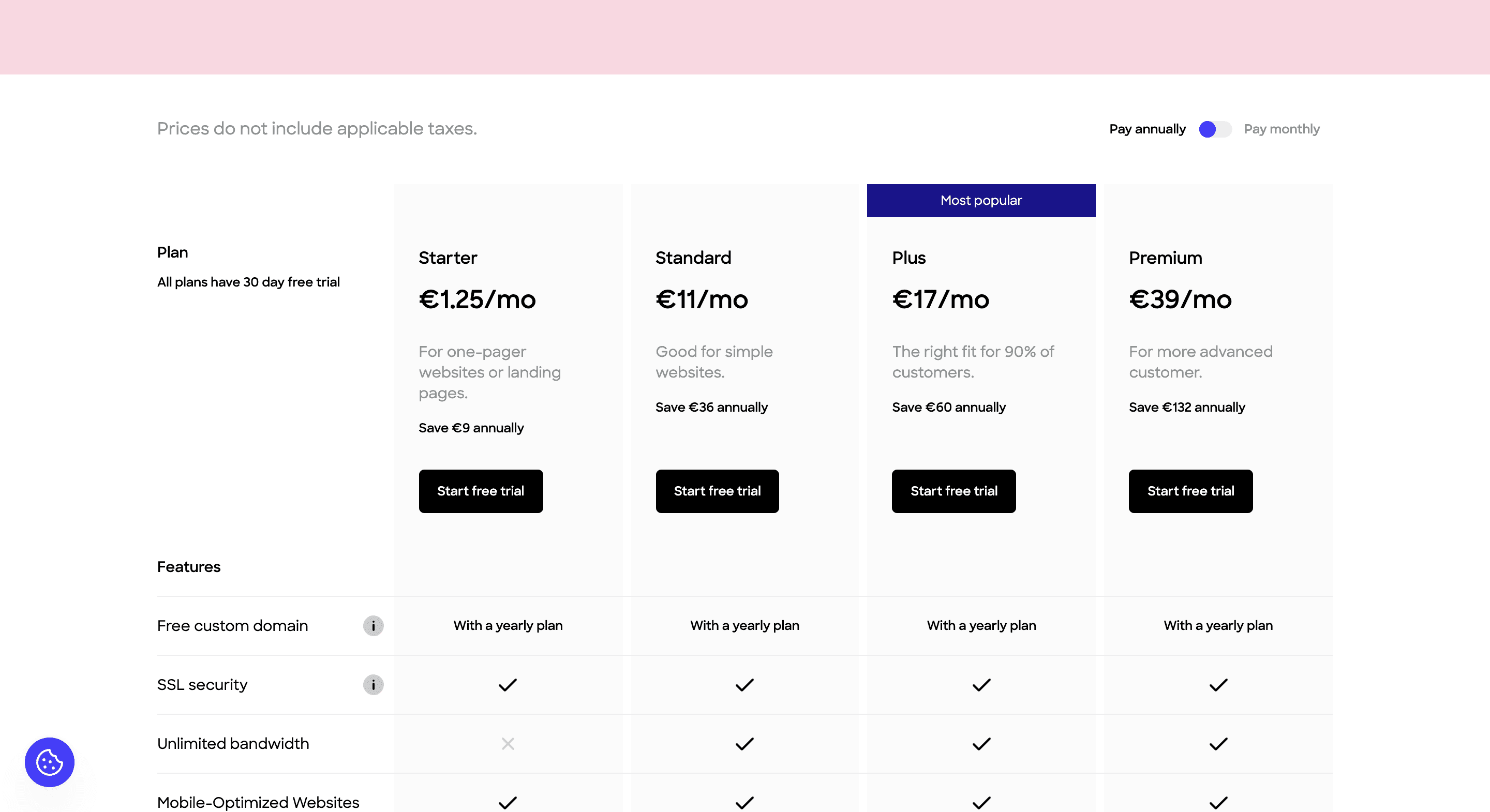
Why it is here. Voog is a website builder born in Tartu in 2007, meant for the Estonian market. For many Estonian small businesses it is a real option, so I add it. To be honest: I have not used Voog professionally. This is what I saw when I looked into it.
What it does well.
- Built for several languages. Multiple languages are its main selling point. For an Estonian builder, that is quite obvious. The Plus plan includes unlimited languages for €17 a month. That is cheaper than Framer with even one extra language.
- Local. Support, the admin and the guides are in Estonian. For a small business owner, that matters.
- Cheap to start. Plans run from €1.25 to €39 a month. The higher plans get expensive, and are still more limited than the others.
Weak points.
- Few templates. There are only a handful, and they all look alike. Some are not clearly accessible. The template quality is questionable, and in my opinion they suit only narrow business areas.
- Limited design freedom. Reviews call the editor limited. A drag-and-drop design tool is still “coming soon”. You can code your own templates, but that probably needs a learning curve. I am afraid other limits need complicated workarounds.
- Limits on cheaper plans. The Starter plan has limited data transfer. A shop pays a 3% fee per sale on every plan except Premium.
- Small. Few reviews, a small ecosystem, and little AI. I found no MCP server.
Verdict. For a simple site in Estonian, Russian and English, with Estonian support, Voog is an okay choice if you want to get started fast and cheap. For a branded, high-quality marketing site, I would choose Framer, especially if you want world-class design.
AI app builders: Lovable, Replit or Base44?
People ask me about the AI app builders: Lovable, Replit, Base44 (now part of Wix) and similar tools.
They are digital product tools. You describe an app, and they write it. They can make a website. But the result has a distinct “AI look”: purple gradient hero, the same typeface, three identical cards, everything centred. Several writers describe the same tells.
Search came second. Lovable only started rendering new projects on the server in May 2026.
Verdict. Good for apps. For marketing websites, my general suggestion is to ignore them.
Website builder prices compared
Per month, without VAT, from each company’s own pricing page on 16 November 2026 (Squarespace and Voog on 18 November). Framer, Squarespace and Voog show euros. Webflow and Wix list US dollars.
Basic plans
| Plan | Price per month | Billing | What you get | |
|---|---|---|---|---|
| Framer | Basic | €10 | Yearly (€15 monthly) | 30 pages, 2 CMS collections, 1,000 items |
| Webflow | Basic | $15 | Yearly | 300 static pages, no CMS |
| Wix | Light | $17 | Yearly | 2 GB storage, 2 collaborators |
| Squarespace | Basic | €11 | Yearly (€15 monthly) | 2 contributors, 2% shop fee |
| Voog | Standard | €11 | Yearly (€14 monthly) | 30 pages, up to 3 languages, 3 editors |
| WordPress | Zone Starter hosting | €9.95 | Yearly | Free software, a server you rent, email |
| Astro | None needed | €0 | Free software. Hosting can be free, the work is not | |
| Lovable | Pro | €21 | Yearly (€25 monthly) | 100 credits a month, custom domain |
Pro plans
| Plan | Price per month | Billing | What you get | |
|---|---|---|---|---|
| Framer | Pro | €30 | Yearly (€45 monthly) | 10 CMS collections, 2,500 items, staging |
| Webflow | Premium | $25 | Yearly ($39 monthly) | CMS, site search, from 50 GB bandwidth |
| Wix | Business | $39 | Yearly | 100 GB, shop, 10 collaborators. Core is $29 |
| Squarespace | Core | €17 | Yearly (€24 monthly) | Unlimited contributors, no shop fee |
| Voog | Plus | €17 | Yearly (€22 monthly) | Unlimited pages, languages and editors, SEO tools |
| WordPress | Zone Business hosting | €16.90 | Yearly | More space and memory. Zone Pro is €30 |
| Astro | Hosting plus a headless CMS | from €0 | A CMS such as Sanity is free to start, paid per editor as the team grows | |
| Lovable | Business | €42 | Yearly (€50 monthly) | More credits, team workspace, SSO, priority support |
- Framer and Lovable both start free. A custom domain needs a paid plan.
- Squarespace has a 14-day free trial. Voog has a 30-day free trial, and a free domain with yearly billing.
- Zone’s Starter is €12.34 a month with Estonian VAT, or €14.82 when paid monthly.
What the extras cost
| Extra language | Extra editor | A/B testing | |
|---|---|---|---|
| Framer | €20 each | €20 full editor, €10 content editor | Convert add-on |
| Webflow | $9 each (Essential, up to 3) or $29 each (Advanced, up to 10) | Needs a paid Workspace plan | Optimize, from $299 |
| Wix | Included | Included, 2 to 100 by plan | Not built in |
| Squarespace | Through Weglot, a separate subscription | 2 on Basic, unlimited on Core | Not on the pricing page |
| Voog | Included, up to 3 on Standard, unlimited on Plus | Included, 3 on Standard, unlimited on Plus | Not built in |
| WordPress | Free with Polylang, or WPML at €99 a year | Free | Through plugins |
| Astro | Free, a language is a folder | Free, it is a Git repository | Your own code |
Webflow’s Essential tier puts each language under its own prefix, such as /et/. Translating the page addresses themselves, so /et/contact becomes /et/kontakt, needs Advanced.
Three scenarios, per year
- Simple site: one language, a blog, one editor.
- Company site: two languages, CMS, one extra content editor.
- International site: five languages, CMS, one extra content editor.
| 1. Simple | 2. Two languages | 3. Five languages | |
|---|---|---|---|
| Framer | €120 (Basic) | €720 (Pro + language + content editor) | €1,440 |
| Webflow | $300 (Premium) | $408 with Essential, $648 with Advanced, plus a seat | $1,692 (Advanced), plus a seat |
| Wix | $204 (Light) | $348 (Core) | $348 (Core) |
| Squarespace | €132 (Basic) | €204 (Core), plus Weglot | €204 (Core), plus Weglot |
| Voog | €132 (Standard) | €132 (Standard) | €204 (Plus) |
| WordPress | €119 (Zone Starter) | €218 with WPML, €119 with Polylang | the same |
| Astro | €0 hosting, plus work | €0 hosting, plus work | €0 hosting, plus work |
- A small two-language site can stay on Framer Basic: €360 a year.
- WordPress software is free. Updates, backups and security checks are not, in money or your own time.
- Astro’s €0 is Cloudflare’s free tier. It is not the same product. A CMS, editor accounts and support cost extra, in tools or professional time.
- Add a domain everywhere: about €10 to €20 a year.
The pattern. With one language, Framer is among the cheapest hosted builders. With each added language, Framer and Webflow climb steeply, and Squarespace adds a Weglot subscription. Wix and Voog stay flat. WordPress and Astro barely move.
AI agents are changing every platform
All of them can now be worked on by an AI agent. The hosted platforms do it through MCP. Astro does not need it.
| Built-in AI | Outside agents | |
|---|---|---|
| Framer | Agent with Skills, choice of model | Official MCP server, in preview |
| Webflow | Webflow AI | MCP server on every plan |
| Wix | Aria in Harmony, Aria 2.0 in Studio Two | MCP for sites and business tools |
| Voog | AI texts and social posts | API, no MCP server found |
| WordPress | AI client in core since 7.0 | Official MCP Adapter plugin |
| Astro | None needed | A coding agent edits the source files directly |
The question has changed. The old one was “visual tool or code”. The new one is “how well can an agent work on my site, and who checks its work”.
Astro is the most open. Nothing stands between the agent and the files. Framer is the most pleasant. The agent works inside a design tool, and you see what it did.
Who owns your site
| Can you leave with your site? | Who keeps it running? | Company risk | |
|---|---|---|---|
| Framer | No official export, but AI can copy the site into code | Framer | Venture-funded |
| Webflow | Static HTML, CSS and JavaScript export, without the CMS | Webflow | Venture-funded, restructuring |
| Wix | Not today. Studio Two promises React export | Wix | Public company |
| Squarespace | Partly: blog posts and basic pages, without the design | Squarespace | Owned by private equity |
| WordPress | Yes, files and database are yours | You or your agency | Open source |
| Astro | Yes, it is a folder of code | You | Open source, backed by Cloudflare |
I put Framer first with open eyes. A marketing site gets redesigned every three or four years anyway. If Framer doubles its prices, the cost is moving the site. For a simple site that is manageable with AI tools. For a large multilingual site it is a real project.
A professional can build a great site anywhere
The tool matters less than the person. I have seen slow, confusing Framer sites. And I have built fast, beautiful WordPress sites that score four times 100 in Google Lighthouse.
Knowing how websites work matters most. I know how to code websites, and that gives me an advantage in every editor. A good website needs someone who understands the human psychology behind it, how to make a page load fast and how to make it responsive. No tool replaces that.
Search engines do not rank platforms. Technical SEO is not everything either. They rank pages that load fast, are structured well, answer the question, and are built for users with good design intent.
Stay with good people. If you already work with someone good, and they are fast and careful in Webflow or WordPress, stay with them. If your platform is causing you trouble, switching is not a big step.
What I would choose
- A marketing site, a small business website, a landing page or a portfolio: Framer.
- A tech-focused company, or a site that pushes the boundaries, where you want full control: Astro.
- A marketing team that needs an advanced CMS and has no developer: Webflow is reasonable.
- A large content site focused on publishing, or you must host it yourself: WordPress, or Astro.
- A small business, mostly in the US, that needs bookings or a shop built in: you may consider Wix.
- A simple English site that should look good quickly: Squarespace works.
- A simple Estonian site in several languages, with local support, on a small budget: you may consider Voog.
- An online shop: Shopify. WooCommerce is fine for a small local shop.
So generally, I would choose Framer.
Need a Framer website built, or an existing site moved to Framer? Send me your current URL or Figma file, or tell me what you want to launch. I will tell you honestly whether Framer fits and what the build would involve. And if the answer is not Framer, I will say that too. Discuss your Framer project.
Sources
Prices and product facts were checked on 16 November 2026 on the companies’ own pages, Squarespace’s and Voog’s on 18 November, and the W3Techs figures on 17 November 2026.
- Framer pricing, Framer Agents and Framer updates
- Framer raises $100M at a $2B valuation, SiliconANGLE
- Webflow pricing, Webflow’s 2026 plan changes and Webflow code export
- Report on the Webflow layoffs of May 2026, The American Bazaar
- Wix plans, the Studio Two announcement, Wix known issues and Wix’s help article on Vibe sites
- Wix annual report for 2025
- Wix Studio review, UIGuides
- Squarespace pricing, Squarespace usage, W3Techs, Weglot for Squarespace and Permira completes acquisition of Squarespace
- Voog pricing, Voog review, Tom’s Guide, and Voog reviews, G2
- Introducing the WordPress MCP Adapter, WordPress Developer Blog
- WordPress REST API handbook and WPGraphQL
- State of WordPress Security in 2026, Patchstack
- Usage of content management systems, yearly history and survey method, W3Techs
- Zone web hosting
- Lovable pricing and Lovable’s move to server rendering
- Astro is joining Cloudflare, Cloudflare, and the Astro blog
- Shopify pricing